MAKIZIG DIRECT WATCH
One-time installation guide for the Netflix Direct Watch feature.
Is this extension safe? Absolutely. This extension does not track your browsing history, collect personal data, or harm your browser in any way. It is a simple, lightweight script designed exclusively to automate the Direct Watch feature so you don't have to copy and paste cookies manually.
Optional: Installing this extension is totally optional. If you prefer to use a standard third-party cookie editor to manually load the JSON codes, you can skip this guide entirely and just use the "COPY JSON" button on the dashboard.
First, download the Makizig_Cookies_Extension.zip file to your computer. Once downloaded, right-click the file and select "Extract All..." to unzip the folder. You must remember where you extracted this folder.
Open a compatible browser (like Chrome or Edge). In the top URL address bar, type the following and press Enter:
(If using Edge, type edge://extensions/)
In the top right corner of the Extensions page, turn ON the switch for Developer mode.
Next, click the "Load unpacked" button that appears on the top left, and select the folder you extracted in Step 1.
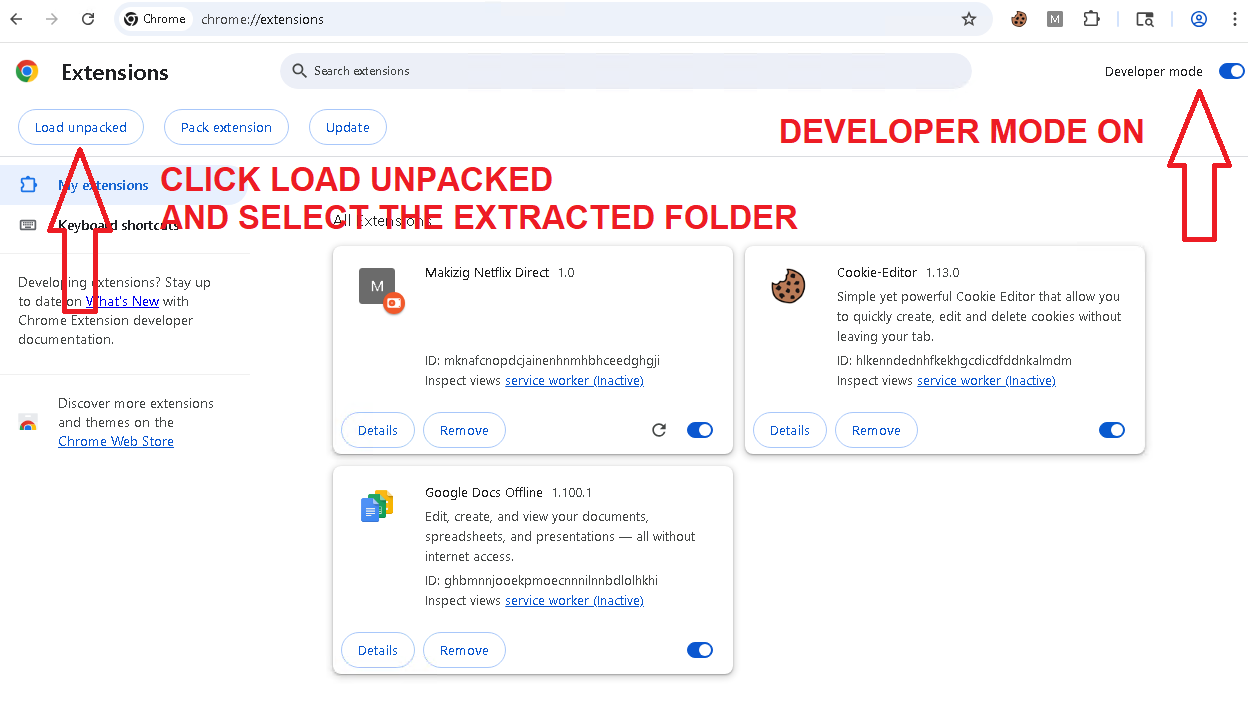
CRITICAL: LEAVE IT TURNED ON
Make sure the toggle switch on the Makizig extension card is turned ON (active). If the extension is turned off, the Direct Watch button will not work.
The Makizig Netflix Direct is now installed. You never have to do this again! You can now return to the dashboard and use the WATCH NOW button instantly.